Practical vocabulary guide
Turn the words you look up into words you remember
Lectern keeps a running list of every word you save while reading, with a definition when available and a spaced-repetition review, then lets you export the whole list as one file for Anki, Quizlet or a spreadsheet.
The short answer
Long-press a word in the reader to look it up. Tap Save to vocab to add it to your vocabulary list. Open Settings → Dictionary & catalogs → Vocabulary to review saved words with spaced repetition, and export the whole list as one CSV file that Anki, Quizlet and any spreadsheet can open directly.
Look up a word while reading
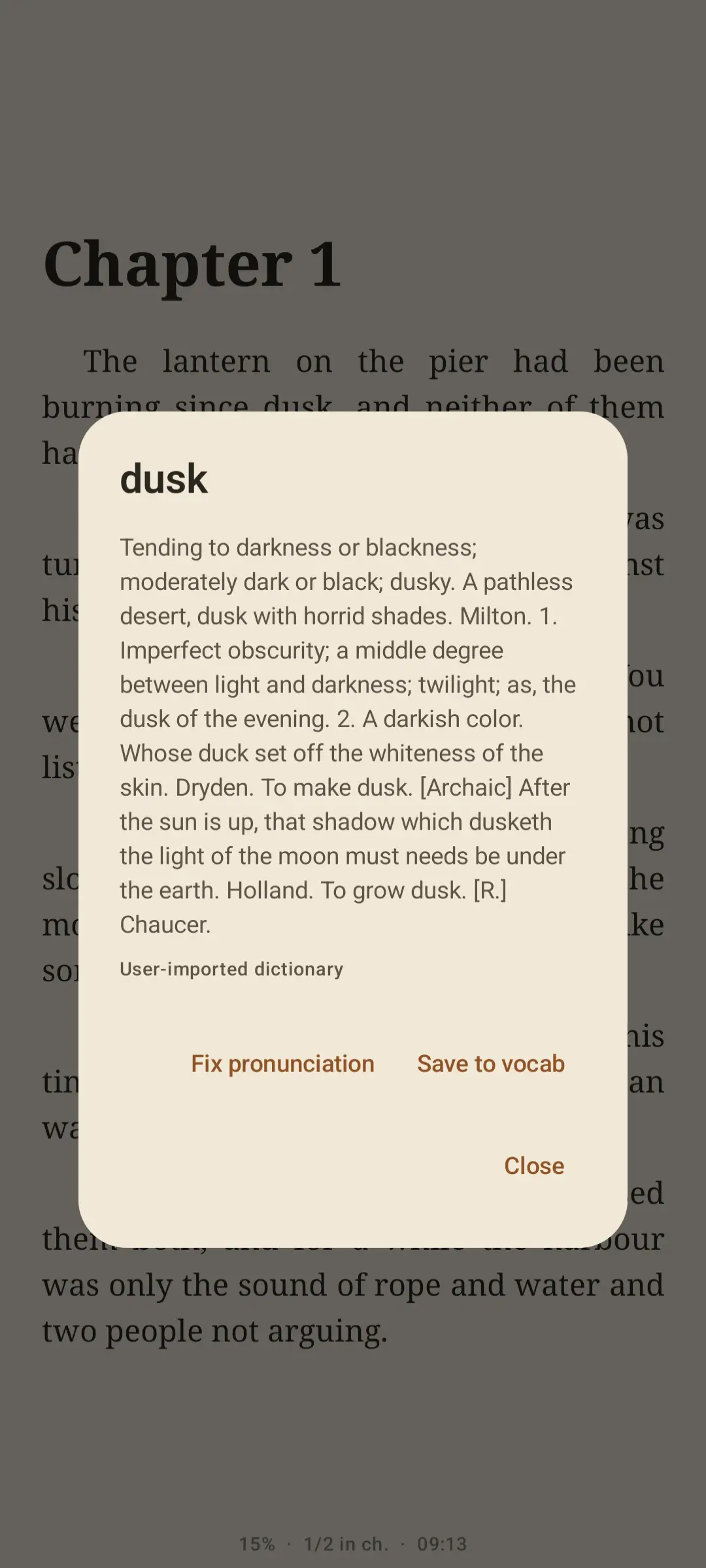
Long-press any word in the text. A popup shows the word, its part of speech and a definition when one is available. For English, Lectern looks it up in WordNet first, which includes examples and synonyms alongside the definition. Only English has a bundled starter dictionary. For other languages, import one using the dictionary import guide. Tap Close to dismiss the popup, or Save to vocab to keep the word.
Your own dictionary wins. If you imported a dictionary, Lectern looks there first; a word missing from it still falls back to WordNet for English. See the dictionary import guide for the lectern-dict-v1 JSON format, useful for a language WordNet does not cover or a specialist glossary of your own.
Highlight mode turns lookups off. Highlight mode marks text with a drag instead, and while it is on, a long-press no longer opens the dictionary popup, so turn highlight mode off first if you want to look a word up.
Save words as you read
When a definition is found, Lectern saves it with the word. You can also save a word without a definition. Lectern keeps the source book, but not the surrounding sentence.
Review with spaced repetition
Open Settings, expand Dictionary & catalogs, and tap Vocabulary. The screen shows how many words you have saved in total and how many are due for review right now.
- Tap the card to reveal any available definition. Each review shows one word at a time.
- Grade yourself. Choose Again, Good or Easy. Again resets the word to one day. Good and Easy both schedule the first successful review after one day and the second after six days. After that, Easy makes intervals grow faster than Good.
- Keep going until you are done. Once every due word has been reviewed, Lectern shows an "all done" card. Come back tomorrow for the next batch.
You can remove a word from the review card at any time if you no longer want to study it.
Export for Anki, Quizlet or a spreadsheet
As soon as you have saved at least one word, an export icon appears on the Vocabulary screen. Tap it to write every saved word to a single CSV file, lectern-words.csv by default, with one column each for the word, part of speech, meaning, source book and the date it was added.
- Anki: use Anki's file import and point it at the CSV. Enable the option that treats the first row as field names so the columns map correctly.
- Quizlet: Quizlet's import-from-file option reads the CSV and its header row directly.
- Spreadsheet: open the CSV in any spreadsheet app to sort, filter or print your list.
Exporting only writes a copy. Your saved words and their review schedule stay in Lectern afterwards.
Frequently asked
Does Lectern save the sentence a word came from?
When a definition is found, Lectern saves it with the word. You can also save a word without a definition. The source book is kept, but the surrounding sentence is not.
Can I look up words in languages other than English?
Only English has a bundled starter dictionary. For other languages, import a dictionary using the dictionary import guide.
What happens if I have both an imported dictionary and WordNet?
The imported dictionary is checked first because you chose it deliberately. If it does not have the word, Lectern still falls back to WordNet for English.
Does exporting remove the words from Lectern?
No. Export writes a copy to a CSV file; your saved words and their review progress stay exactly as they were.
Keep reading
Related guides

Words you looked up, words you keep
Read, save what you want to remember, and take the list with you when you want to study it elsewhere.
Get it onGoogle Play